Cloud computing has transformed how businesses operate, and MS Azure stands as one of the most powerful platforms driving this revolution. With unmatched scalability, security, and integration, MS Azure empowers organizations to innovate faster and smarter.




What Is MS Azure and Why It Matters

Microsoft Azure, commonly referred to as MS Azure, is a comprehensive cloud computing platform developed by Microsoft. Launched in 2010, it has rapidly evolved into one of the top three cloud providers globally, competing directly with Amazon Web Services (AWS) and Google Cloud Platform (GCP). MS Azure offers over 200 services, including computing, analytics, storage, networking, and machine learning, all accessible via a pay-as-you-go model.
Core Components of MS Azure
MS Azure is built on a modular architecture, allowing users to pick and choose services based on their needs. The platform is divided into several key service categories:
- Compute: Virtual machines, containers, serverless functions, and batch processing.
- Storage: Blob storage, file shares, disk storage, and data lakes.
- Networking: Virtual networks, load balancers, firewalls, and content delivery networks (CDN).
- Databases: Azure SQL Database, Cosmos DB, MySQL, PostgreSQL, and managed instances.
- AI & Machine Learning: Cognitive Services, Azure Machine Learning, and Bot Framework.
Each component is designed to work seamlessly with others, enabling developers and IT professionals to build end-to-end solutions without worrying about infrastructure compatibility.
Global Infrastructure and Availability
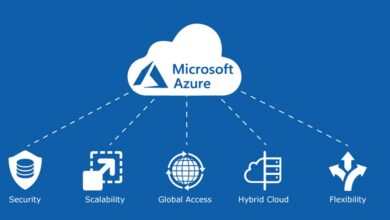
One of MS Azure’s standout features is its vast global footprint. As of 2024, Microsoft operates in over 60 regions worldwide, more than any other cloud provider. This extensive network ensures low latency, high availability, and compliance with local data regulations.
For example, Azure’s presence in regions like South Africa, India, and Switzerland allows businesses to store data locally, meeting strict GDPR and data sovereignty requirements. You can explore Azure’s full regional availability here.
“Azure’s global scale enables enterprises to deploy applications closer to their users, reducing latency and improving performance.” — Microsoft Azure Official Documentation
Key Benefits of Using MS Azure
Organizations choose MS Azure not just for its features, but for the tangible business value it delivers. From cost savings to enhanced security, the platform offers a compelling case for digital transformation.
Scalability and Flexibility
MS Azure allows businesses to scale resources up or down based on demand. Whether you’re running a small web app or a large enterprise system, Azure’s auto-scaling capabilities ensure optimal performance without over-provisioning.
- Vertical scaling: Increase VM size (CPU, RAM) instantly.
- Horizontal scaling: Add more instances during traffic spikes.
- Serverless options: Use Azure Functions to run code without managing servers.
This flexibility is especially valuable for startups and seasonal businesses that experience fluctuating workloads.
Cost Efficiency and Pricing Models
Unlike traditional on-premise infrastructure, MS Azure operates on a consumption-based pricing model. You only pay for what you use, which can lead to significant cost savings.
Azure offers several pricing tiers and discounts:
- Pay-as-you-go: Ideal for unpredictable workloads.
- Reserved Instances: Save up to 72% by committing to 1- or 3-year terms.
- Hybrid Benefit: Use existing Windows Server and SQL Server licenses to reduce costs.
- Free Tier: Access to 55+ services for 12 months, plus $200 credit for new users.
You can calculate your estimated costs using the Azure Pricing Calculator.
MS Azure vs. AWS vs. Google Cloud: A Comparative Analysis
While AWS leads in market share, MS Azure has been closing the gap rapidly, especially in enterprise adoption. Understanding the differences helps organizations make informed decisions.
Market Share and Enterprise Adoption
According to Synergy Research Group (2023), AWS holds about 32% of the cloud market, followed by MS Azure at 23%, and Google Cloud at 10%. However, Azure dominates in hybrid cloud scenarios and integration with Microsoft 365, Active Directory, and Windows environments.
Enterprises already using Microsoft products find it easier to migrate to MS Azure due to seamless integration. For example, Azure Active Directory (Azure AD) allows single sign-on (SSO) across cloud and on-premise applications.
Service Offerings and Innovation
All three platforms offer similar core services, but MS Azure excels in specific areas:
- Hybrid Cloud: Azure Stack enables on-premise deployment of Azure services.
- AI and Cognitive Services: Pre-built APIs for vision, speech, language, and decision-making.
- IoT Integration: Azure IoT Hub supports millions of devices with real-time analytics.
- DevOps Tools: Azure DevOps provides CI/CD pipelines, project management, and testing tools.
While AWS has a broader service catalog, MS Azure focuses on integration and ease of use for enterprise workflows.
Security and Compliance in MS Azure
Security is a top concern for cloud adopters, and MS Azure addresses this with a multi-layered approach. Microsoft invests over $1 billion annually in cybersecurity and employs more than 3,500 security experts.
Built-In Security Features
MS Azure provides a suite of security tools out of the box:
- Azure Security Center: Unified security management and advanced threat protection.
- Azure Firewall: Managed, cloud-native firewall service.
- DDoS Protection: Mitigates distributed denial-of-service attacks.
- Key Vault: Securely stores and manages cryptographic keys and secrets.
- Identity Protection: Detects and responds to identity-based risks.
These tools help organizations detect vulnerabilities, prevent breaches, and respond to incidents in real time.
Compliance and Certifications
MS Azure complies with over 140 international and industry-specific standards, including:
- GDPR (General Data Protection Regulation)
- ISO 27001, 27017, 27018
- HIPAA (Health Insurance Portability and Accountability Act)
- SOC 1, SOC 2, SOC 3
- PCI DSS (Payment Card Industry Data Security Standard)
This makes MS Azure a trusted choice for regulated industries like finance, healthcare, and government. A full list of compliance offerings is available on Microsoft’s compliance page.
MS Azure for Developers and IT Professionals
MS Azure is not just for enterprises—it’s a powerful platform for developers, startups, and IT teams looking to build, test, and deploy applications efficiently.
Development Tools and SDKs
Microsoft provides robust tools to streamline development on MS Azure:
- Visual Studio and VS Code: Full integration with Azure for debugging, deployment, and monitoring.
- Azure CLI and PowerShell: Command-line tools for automation and scripting.
- SDKs: Available for .NET, Python, Java, Node.js, Go, and more.
- GitHub Integration: Azure Pipelines can trigger builds directly from GitHub repositories.
These tools enable developers to adopt DevOps practices and accelerate time-to-market.
Containerization and Kubernetes
MS Azure supports modern application architectures through containerization. Azure Kubernetes Service (AKS) simplifies the deployment, management, and scaling of Kubernetes clusters.
- Automated upgrades and patching
- Integration with Azure Monitor for performance insights
- Support for multi-region and hybrid deployments
- Serverless Kubernetes with Azure Container Apps
AKS reduces operational overhead, allowing teams to focus on application logic rather than infrastructure management.
Real-World Use Cases of MS Azure
MS Azure is used across industries to solve real business challenges. From disaster recovery to AI-driven analytics, the platform enables innovation at scale.
Disaster Recovery and Backup Solutions
Business continuity is critical, and MS Azure offers robust disaster recovery options:
- Azure Site Recovery: Replicates on-premise VMs and physical servers to Azure.
- Azure Backup: Centralized backup for VMs, files, and databases.
- Geo-Redundant Storage (GRS): Copies data to a secondary region for failover.
Organizations like British Petroleum and BMW use Azure for mission-critical backup and recovery, ensuring minimal downtime during outages.
AI and Machine Learning Applications
MS Azure democratizes AI with accessible tools for developers and data scientists:
- Azure Machine Learning: Drag-and-drop interface or code-based model training.
- Cognitive Services: Pre-trained models for image recognition, sentiment analysis, and speech-to-text.
- Form Recognizer: Extracts data from invoices, receipts, and forms automatically.
- Personalizer: Implements reinforcement learning for personalized user experiences.
For example, the BBC uses Azure AI to automatically tag and categorize thousands of media assets, improving content discoverability.
Getting Started with MS Azure: A Step-by-Step Guide
Starting with MS Azure is straightforward, even for beginners. Follow these steps to set up your first cloud environment.
Creating an Azure Account
Visit azure.microsoft.com/free to sign up for a free account. You’ll get:
- $200 credit valid for 30 days
- Access to over 55 free services for 12 months
- No upfront costs or expiration fees
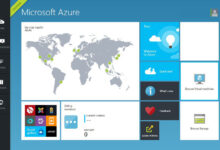
After registration, you can access the Azure portal, a web-based interface to manage all your resources.
Navigating the Azure Portal
The Azure portal is the central hub for managing your cloud environment. Key features include:
- Dashboard: Customize with widgets for VMs, costs, alerts.
- Resource Groups: Logical containers to organize related services.
- Marketplace: Deploy pre-built solutions like WordPress, Docker, or SAP.
- Cost Management: Track spending and set budgets.
Familiarizing yourself with the portal is the first step toward mastering MS Azure.
Future Trends and Innovations in MS Azure
MS Azure is not standing still. Microsoft continues to invest heavily in emerging technologies, positioning Azure as a leader in the next wave of digital transformation.
Edge Computing and Azure IoT Edge
As latency-sensitive applications grow, edge computing is becoming essential. Azure IoT Edge allows you to run cloud intelligence directly on devices.
- Process data locally instead of sending it to the cloud
- Support for AI models on edge devices
- Integration with Azure Stream Analytics and Machine Learning
This is particularly useful in manufacturing, healthcare, and retail environments where real-time decisions are critical.
Quantum Computing with Azure Quantum
Microsoft is pioneering quantum computing through Azure Quantum, a cloud service that provides access to quantum hardware and software.
- Partnered with companies like IonQ and Quantinuum
- Q# programming language for quantum algorithm development
- Simulators to test quantum circuits before running on real hardware
While still in early stages, Azure Quantum opens doors for breakthroughs in cryptography, materials science, and complex system modeling.
What is MS Azure?
MS Azure is Microsoft’s cloud computing platform that provides a wide range of services including virtual machines, storage, databases, AI, and networking. It enables businesses to build, deploy, and manage applications in the cloud.
How much does MS Azure cost?
MS Azure uses a pay-as-you-go pricing model. New users get $200 credit and access to free services for 12 months. Costs vary based on usage, but tools like the Azure Pricing Calculator help estimate expenses.
Is MS Azure secure?
Yes, MS Azure is highly secure, with built-in features like Azure Security Center, DDoS protection, and compliance with over 140 standards including GDPR and HIPAA.
Can I use MS Azure for machine learning?
Absolutely. MS Azure offers Azure Machine Learning, Cognitive Services, and AI tools that allow developers and data scientists to build, train, and deploy models at scale.
How does MS Azure compare to AWS?
While AWS has more services, MS Azure excels in hybrid cloud integration, enterprise compatibility with Microsoft products, and ease of use for Windows-based environments.
MS Azure has firmly established itself as a leader in the cloud computing space. Its combination of global reach, enterprise-grade security, developer-friendly tools, and innovation in AI and quantum computing makes it a powerful choice for organizations of all sizes. Whether you’re migrating legacy systems, building modern applications, or exploring cutting-edge technologies, MS Azure provides the infrastructure and services to succeed. As digital transformation accelerates, MS Azure will continue to play a pivotal role in shaping the future of technology.
Further Reading: